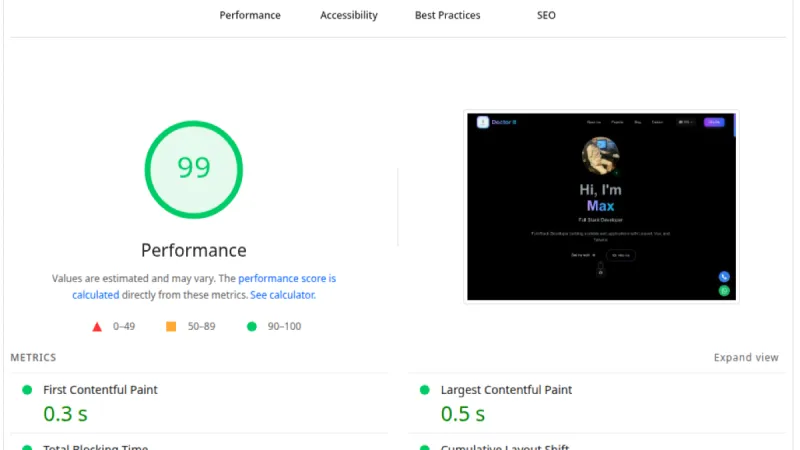
As a web developer, you tend to believe that you can code your way out of any performance issue. You reduce the DOM size, strip out unused CSS, implement lazy loading for images, and get your Cumulative Layout Shift (CLS) down to a perfect 0.
That’s exactly what I did recently for my portfolio. The structure was flawless, scripts were deferred correctly, but the mobile score on Google PageSpeed Insights stubbornly refused to break past 78, and the LCP (Largest Contentful Paint) metric was stuck at over 4 seconds.
The problem? It wasn't my code. It was the laws of physics. Here is why routing your traffic through a CDN (Content Delivery Network) like Cloudflare has become an absolute necessity, not just a luxury.
The Invisible Enemy: Geographic Latency
When you test a site with PageSpeed Insights, the mobile simulation (Moto G Power, 4G network) is often run from servers in the US. If your server is in Europe, geographic latency strikes.
In my case, even though my custom web font file was only a few kilobytes, downloading it took over 1.1 seconds. The browser refused to render the Hero text until it received that font. I could optimize the code endlessly; the physical distance between the server and the user would always add a one-second penalty to the load time.
When you are fighting for a 90+ score, losing a full second to network latency means you’ve already lost the game.
The Solution: Going Global with Cloudflare
The decision to route my traffic through Cloudflare completely changed the rules. Cloudflare caches static files (images, CSS, fonts) and distributes them across hundreds of "edge servers" worldwide.
The immediate result? When the Google server in the US requested my site, Cloudflare delivered the font and assets from a node just a few miles away, rather than across an ocean. The font download time plummeted from 1,168 ms to just a few dozen milliseconds. The LCP dropped instantly, and the performance score skyrocketed to 92.
Speed vs. Design: How a CDN Saves Your UI
A massive (and often overlooked) benefit of using a CDN is the "performance budget" it frees up for your design.
Budget mobile processors are weak. If the network eats up 2 seconds of the load time, the phone no longer has the processing power to calculate complex CSS animations, background blurs, or parallax effects without destroying the PageSpeed score. Before Cloudflare, the only way to maintain mobile speed was to strip away the cool animations (Mobile Speed, Desktop Beauty).
Once Cloudflare took over the network burden, the phone's CPU got those precious seconds back. I was able to reactivate all the premium visual elements—animated backgrounds, spinning rings, and fluid transitions—while maintaining an elite PageSpeed score.
Beware of SEO Traps: The Managed robots.txt Case
As you set up a CDN, you must keep an eye on automated features. On my journey to a 100% SEO score, I hit an unexpected PageSpeed error: "robots.txt is not valid".
What happened? Cloudflare recently introduced a proactive feature ("AI Crawl Control") that blocks AI training bots (like ChatGPT) from scraping your content. To do this, it automatically injects the line Content-Signal: search=yes,ai-train=no into your robots.txt file at the network level.
While the intention is good, Google's strict validator does not officially recognize this directive yet, marking it as a syntax error and dropping your SEO score.
The fix? I went into the Cloudflare settings (AI Crawl Control) and toggled off the "Managed robots.txt" button. This allowed my original, clean file to pass through to Google, bringing the SEO score back to a perfect 100.
Conclusion
Code optimization (reducing the DOM, inlining fonts, using .webp formats) is only 50% of the equation for a top-tier website. The other 50% is the delivery infrastructure.
You cannot program a solution against physical distance. If you want your web application to deliver an instantaneous experience globally without compromising on UI/UX, routing your traffic through a service like Cloudflare is no longer optional—it is mandatory.
Need help getting your website or app to a 90+ score? As a Full-Stack Developer specializing in Laravel, Vue, and advanced web optimization, I can help you break through performance barriers. Contact me and let's work together.